

2Ho seta lebenkele
Dintho tsa motheo tseo lebenkele le leng le le leng le di hlokang: hore na o mang, kamoo bareki ba lefang kateng le kamoo diodara di ba fihlelang kateng. O tla fumana tsena tsohle tlasa Settings → Store setup, e le mehato e mehlano e mekgutshwane kahodimo ho leqephe.
Dintlha tsa lebenkele #
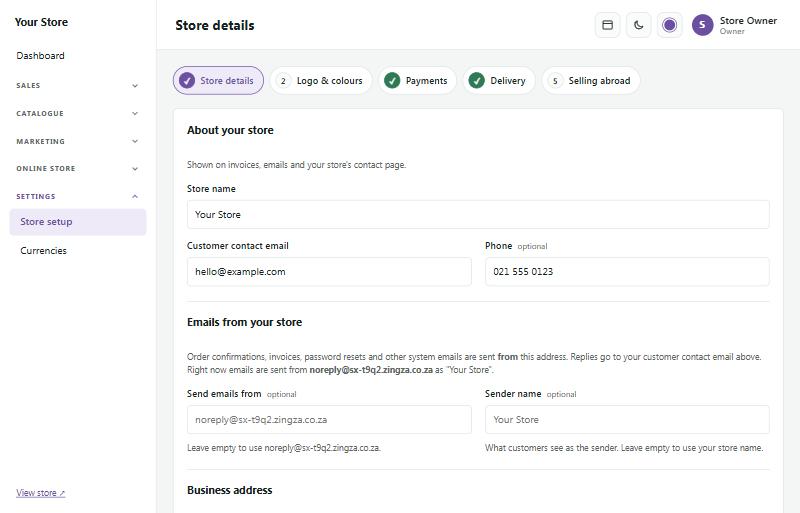
Settings → Store setup → Store details
- Store name (lebitso la lebenkele): le bontshwa hloohong ya lebenkele la hao (haeba o se na logo), di-invoice le diimeileng.
- Customer contact email le phone (imeile le nomoro ya fono eo bareki ba ikopanyang le wena ka yona): di bontshwa bareking mme di sebediswa ha ba araba diimeile tsa hao.
- Emails from your store: aterese eo ditiiso tsa diodara, di-invoice le diimeile tse ding di romelwang ho tswa ho yona, le lebitso leo bareki ba le bonang e le moromedi.
- Business address, VAT number, company registration le importer's code (aterese ya kgwebo, nomoro ya VAT, ngodiso ya k'hamphani le khoutu ya mokenyi wa thepa: khoutu ya hao ya mokenyi wa thepa ho tsa custom, haeba o na le yona): di bontshwa maqepheng a hao a molao. Pela nomoro ka nngwe, Show on invoices (bontsha di-invoice) le Show in the store footer (bontsha footer ya lebenkele) di kgetha hore na e hlaha hape kae. Molao wa Afrika Borwa (ECTA karolo ya 43) o batla hore lebitso la hao, dintlha tsa ho ikopanya le wena le aterese ya hao ya nnete di be websaeteng ya hao.
Tobetsa Save and continue ho ya mohatong o latelang.
Logo, mebala le letshwao la websaete #
Settings → Store setup → Logo & colours
- Logo: PNG e nang le bokamorao bo bonaletsang e sebetsa hantle ka ho fetisisa. E bontshwa hloohong ya lebenkele, di-invoice le lenaneng la hao la ditheko.
- Logo for dark mode: mofuta o mosweu kapa o bobebe wa logo, o bontshwang ha bareki ba fetolela lebenkele la hao ho dark mode (mmala o lefifi) le ho footer e lefifi.
- Logo for phones le Phone logo for dark mode: mofuta o monyane (mohlala lebitso ntle le tagline, kapa letshwao le lenyane) bakeng sa difono le ditabelete, moo logo e pharaletseng e neng e tla fokotseha haholo. Ha ho se le e nngwe, logo e ka sehloohong e a sebediswa.
- Site icon: setshwantsho se senyenyane se sekwere ho di-tab tsa browser le di-bookmark, le setshwantsho se bontshwang ha motho a arolelana link ya lebenkele la hao (ka mohlala ho WhatsApp). Sebedisa letshwao le bonolo le sekwere, bonyane dipikselse tse 192 × 192. Ho fihlela o kenya ya hao, SaleCart e o etsetsa yona: tlhaku ya pele ya lebitso la lebenkele la hao sekwereng se nang le dikhutlo tse chitja ka mmala wa brand ya hao. E fetoha ha o fetola lebitso kapa mmala. Kgetha Remove this icon ho kgutlela ho ya iketsahallang.
- Brand colour: o sebediswa bakeng sa dikonopo, di-link le dintho tse totobaditsweng.
- Tagline: mola o le mong o mokgutshwane ka lebenkele la hao, o sebediswang diphethong tsa ho batla le ponong ya di-link.
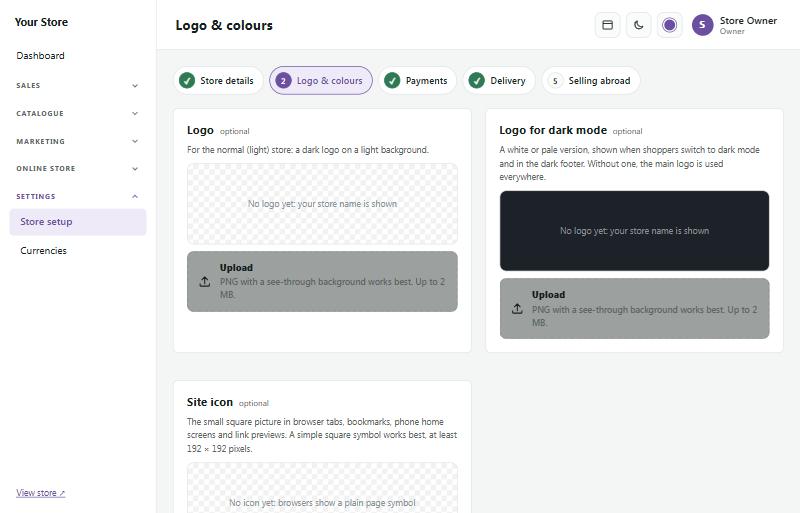
Pono e ka tlase e bontsha hlooho ya lebenkele la hao ka light le dark mode pele o boloka.
Ditefo #
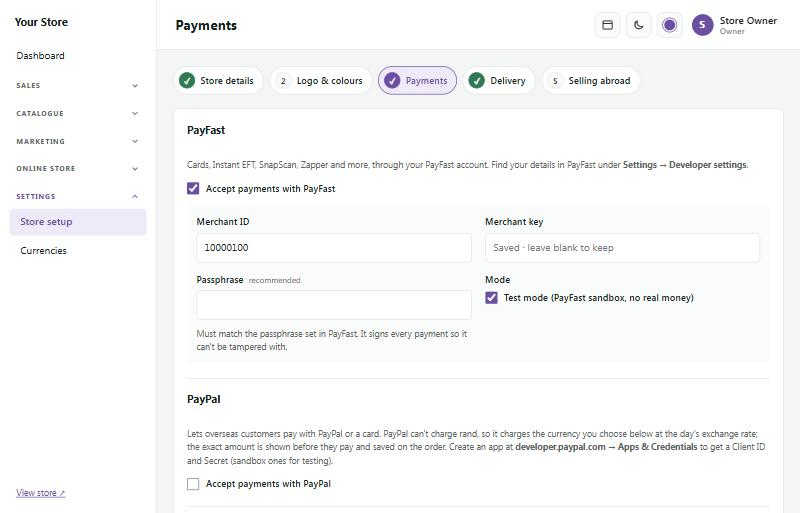
Settings → Store setup → Payments
Bulela ditsela tseo o batlang hore bareki ba lefe ka tsona:
- PayFast: dikarete, Instant EFT, SnapScan, Zapper le tse ding. Kenya Merchant ID, Merchant key le Passphrase ho tswa akhaontong ya hao ya PayFast (Settings → Developer settings ho PayFast). Tlosa letshwao ho Test mode ha o se o loketse ho amohela tjhelete ya nnete.
- Yoco: ditefo ka dikarete (Visa, Mastercard, Apple Pay, Google Pay). Kenya (paste) secret key ya hao ho tswa ho Yoco (Sales → Payment gateway). Senotlolo se qalang ka `sk_test_` se amohela ditefo tsa teko; sebedisa senotlolo sa hao sa `sk_live_` ho amohela tjhelete ya nnete. Ditsebiso tsa ditefo di setwa le Yoco bakeng sa hao ha o boloka.
- Ozow: instant EFT, hang ho tswa akhaontong ya banka ya moreki. Kenya site code ya hao, le client ID le client secret ho tswa portal ya Ozow (One API → Clients). Tlosa letshwao ho Test mode ha o se o loketse ho amohela tjhelete ya nnete. Ha se ntho e qobellwang: eketsa webhook portal ya Ozow e supang aterese e bontshwang leqepheng la disetting, e le hore ditefo di netefatswe leha moreki a ka kwala leqephe kapele.
- Peach Payments: dikarete, instant EFT, reka-jwale-o-lefe-hamorao (buy-now-pay-later) le dikgetho tse ding tseo o nang le tsona ho Peach. Kenya merchant ID, entity ID, client ID le client secret ho tswa dashboard ya Peach Payments, mme o eketse aterese ya lebenkele la hao ho di-domain tse dumelletsweng tlasa Checkout ho Peach. Tlosa letshwao ho Test mode ha o se o loketse ho amohela tjhelete ya nnete.
- PayPal: e dumella bareki ba mose ho mawatle ho lefa ka tjhelete ya naha ya bona. O hloka Client ID le Secret ho tswa ho developer.paypal.com.
- EFT (bank transfer): kenya dintlha tsa banka ya hao. Bareki ba di bona ho checkout le imeileng ya odara ya bona. Kgetha hore na o tla boloka odara ya EFT e sa lefuwang matsatsi a makae pele e hlakolwa.
Reka hona joale, o lefe hamorao
Bareki ba ka arola odara hore e be ditefo tse se nang tswala. Mofani o o lefa odara kaofela (ho ntshitswe tefo ya hae) mme o bokella ditefo ho moreki. Mofani e mong le e mong o hloka akhaonto ya hae ya morekisi, mme e mong le e mong o qala a tjhesitswe.
- Payflex: lefa ka tse 4, kotara ha o lefa mme tse setseng beke tse ding le tse ding tse pedi. Kenya client ID le client secret tseo Payflex e o romellang tsona. Ditjhelete tse tlase le tse hodimo tsa odara di tswa akhaontong ya hao ya Payflex mme di hlahlojwa letsatsi le leng le le leng.
- PayJustNow: lefa ka tse 3, kgwedi pakeng tsa tsona. Kenya merchant ID le API key ya hao ho tswa ho PayJustNow, le odara e nyane le e kgolo tumellanong ya hao.
- Happy Pay: lefa ka tse 2, matsatsing a mabedi a latelang a moputso wa moreki. Happy Pay e tla ka Ozow kapa Peach Payments: ba kope hore ba e bulele akhaonto ya hao, ebe o kgetha tsela eo ya ho lefa tlasa Paid through. Bareki ba kgetha Happy Pay leqepheng la ho lefa la Ozow kapa la Peach.
Tobetsa Test connection ho hlahloba dintlha tse bolokilweng. Test mode e sebedisa sandbox ya mofani, ntle le tjhelete ya nnete. Mofani o hlaha ha ho lefuwa feela ha kakaretso ya odara e le ka hare ho ditjhelete tsa hae, mme ha ho mohla a hlahang bakeng sa lay-by.
Di-switch tse pedi di bontsha "Or 4 interest-free payments of R … with Payflex" tlasa ditheko tsa dihlahiswa le kariking.
Ho kgutlisetsa tjhelete ya odara ya Payflex kapa ya PayJustNow, sebedisa Refund odareng mme o kgethe Back to how they paid: tjhelete e kgutliswang e ya ho mofani hang-hang. Haeba mofani a e hana, ha ho letho le ngolwang mme lebaka le a bontshwa.
Thomelo #
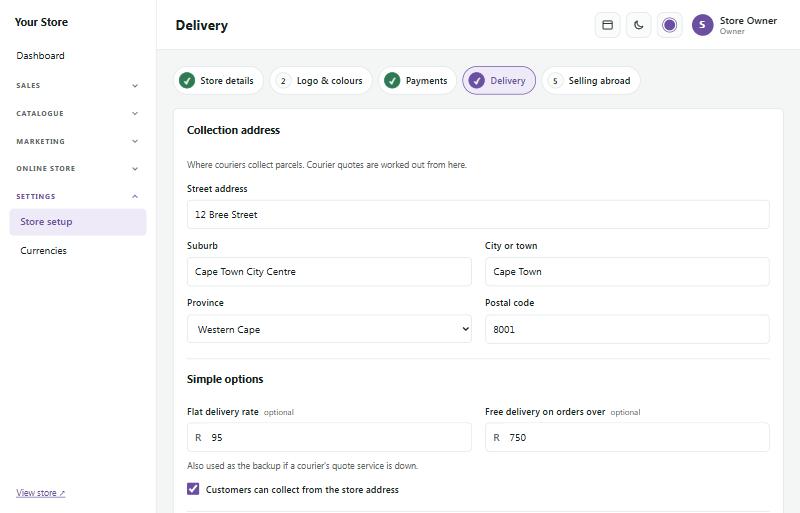
Settings → Store setup → Delivery
- Collection address (aterese ya ho lata): moo dikhuriara di latang diphasele teng. Ditheko tsa dikhuriara di balwa ho tloha mona.
- Flat delivery rate: theko e le nngwe bakeng sa odara e nngwe le e nngwe, ka mohlala R95.
- Free delivery on orders over: ka mohlala R750. Le siye le se na letho haeba o sa batle ho fana ka thomelo ya mahala le ka mohla.
- Customers can collect: tshwaya mona haeba bareki ba ka itatela thepa atereseng ya hao mahala.
- Couriers (ha se ntho e qobellwang): hokahanya The Courier Guy, Bob Go, Fastway, FedEx kapa DHL ho bontsha ditheko tsa thomelo tsa nako yona eo ho checkout le ho latedisa diphasele ka bo yona.
- Lockers and pickup points (ha se ntho e qobellwang): bulela PUDO lockers kapa Pargo pickup points e le hore bareki ba ka romellwa phasele ya bona ho locker kapa lebenkeleng le haufi le bona.
Boima le boholo ba sehlahiswa ka seng (leqepheng la sehlahiswa tlasa Shipping) di sebediswa bakeng sa ditheko tsa dikhuriara.
Bob Go
Bob Go ke akhaonto e le nngwe bakeng sa dikhuriara tse ngata. Kenya API key ho tswa akhaontong ya hao ya Bob Go (Settings → API keys). Checkout e bontsha ditheko tsa thomelo tseo o di setileng ho Bob Go. Ha o booka odara, o kgetha ho tswa ditshebeletsong le ditheko tsa dikhuriara ka bo tsona, mme Bob Go e romela booking ho khuriara eo.
Di-locker tsa PUDO le dibaka tsa ho lata tsa Pargo
Ho checkout moreki o kgetha PUDO locker kapa Pargo pickup point, ebe o kgetha locker kapa lebenkele. Ba ka ngola sebaka sa bona (suburb), toropo kapa khoutu ya poso, kapa ba tobetse Use my location. Ha ba hloke ho tlatsa aterese ya lehae. Sebaka se kgethilweng se bontshwa odareng mme e ba aterese ya yona ya thomelo.
- PUDO: kenya API key ya hao ho tswa portal ya bareki ya PUDO. Theko e itshetlehile ka boholo ba lebokose la locker (XS ho isa ho XL). Lebenkele la hao le kgetha lebokose le lenyenyane ka ho fetisisa le lekanang phasele. Tlasa How parcels start, kgetha hore na mokganni o tla lata ho wena, kapa o tla isa diphasele ho locker ya hao ya PUDO (ho theko e tlase; kenya khoutu ya yona).
- Pargo: kenya lebitso la mosebedisi la API le phasewete eo Pargo e o romelletseng tsona, le theko ya hao ya Pargo ka phasele (Pargo e lefisa theko e tsitsitseng e konterakeng ya hao).
Markup ya hao le tefo ya ho sebetsana le thepa (handling fee) di ekelwa le ditheko tsa di-locker le dibaka tsa ho lata. Thomelo ya mahala ka hodima palo eo o e setileng e ya kgethong e theko e tlase ka ho fetisisa, ebang ke khuriara, locker kapa sebaka sa ho lata.
Dikhampani tse ding tsa thomelo
- Courier IT le CitiSprint: ka bobedi di sebetsa sethaleng sa ShipLogic, jwalo ka The Courier Guy. Tshwaya khampani, kenya senotlolo sa API se tswang akhaonteng ya hao ho khampani eo, boloka ebe o leka. O fumana ditheko hang-hang, ho bukisa, di-waybill le ho sala morao. Bareki ba fumana sehokelo se yang leqepheng la ho sala morao la khampani.
- Uber Direct: thomelo ka lona letsatsi leo ke mokganni wa Uber. Kenya customer ID, client ID le client secret tse tswang ho dashboard ya hao ya Uber Direct, ebe o ngola ditoropo, dibaka kapa dikhoutu tsa poso tse haufi le wena, e le nngwe moleng ka mong (80\* e akaretsa khoutu e nngwe le e nngwe ya poso e qalang ka 80). E fanwa feela ho diaterese tseo. E bukise leqepheng la odara; moreki o fumana sehokelo sa Uber sa ho sala morao.
- Parcelninja: bakeng sa mabenkele ao thepa ya ona e leng polokelong ya Parcelninja. Kenya lebitso la mosebedisi la API le phasewete. Book odareng e lefilweng e e romela ho Parcelninja, kapa tshwaya lebokose hore diodara tse lefilweng di iromele. Dintho di bapiswa ka SKU. Ha Parcelninja e romela phasele, odara e tshwauwa e rometswe mme moreki o fumana nomoro ya ho sala morao ya khampani.
- Dikhampani tsa Bob Go ka mabitso: tlasa Bob Go, kgetha These couriers' own prices ebe o tshwaya dikhampani tse kang RAM kapa Skynet. Bareki ba bona theko ya khampani ka nngwe ka lebitso, mme o bukisa tshebeletso yona eo leqepheng la odara. Ke dikhampani feela tse hokahantsweng le akhaonte ya hao ya Bob Go tse ka fanang ka ditheko.
Dikhampani tse ding (tseo o di bukisang ka bowena)
Settings → Store setup → Delivery → Other couriers
Bakeng sa dikhampani tseo o di bukisang ka bowena, ka mohala kapa websaeteng ya tsona: Dawn Wing (DPD), RAM, Skynet, Globeflight, Paxi, PostNet, Picup kapa efe kapa efe e nngwe. Kgetha e nngwe lenaneng (leqephe la yona la ho sala morao le se le tladitswe) kapa o kenye ya hao, beha theko (theko e le nngwe, kapa ho fihlela ho maemo a mahlano a boima a kang "ho fihla ho 2 kg: R65"), ebe o e bulela. Bareki ba lefa theko eo o e behang; phaello ya hao e eketswang ha e kenngwe.
- To the door: e isoa atereseng ya moreki.
- Counter to counter (Paxi, PostNet): moreki o ngola lebenkele la PEP kapa la PostNet moo a tla lata teng, le sehokelo sa ho fumana mabenkele a khampani.
- Local same-day (mohlala Picup): e fanwa feela ho ditoropo, dibaka kapa dikhoutu tsa poso tseo o di ngotseng.
Ha o romela phasele, kgetha khampani tlasa Mark as shipped ebe o ngola nomoro ya waybill. Imeile le leqephe la odara la moreki di bontsha sehokelo sa Track your parcel. Atereseng ya leqephe la ho sala morao, kenya {code} moo nomoro ya waybill e yang teng. Ntle le yona, sehokelo se bula leqephe la ho sala morao la khampani mme moreki o ngola nomoro.
Dintho tse kgolo, dikhuriara tse ikgethileng, ho tshwara le inshorense
Catalogue → Products → a product → Delivery
Bakeng sa dintho tse sa kgoneng ho kena feela lebokoseng le le leng le tse ding kaofela, jwalo ka setulo sa mabidi, tafole ya ho silila kapa disebediswa tse hlokang tlhokomelo:
- Ships on its own: ho checkout, ntho eo e fumana kgetho ya yona ya thomelo le theko ya yona, mme tse ding tse kariking di tsamaya hammoho. Moreki ya rekang setulo sa mabidi, tafole ya ho silila le lebokose la thuso ya pele o kgetha khuriara bakeng sa e nngwe le e nngwe ya tse tharo. Tse pedi tsa ntho e tshwanang di tsamaya le khuriara e le nngwe, theko e le ka lebokose.
- Only these couriers: tshwaya dikhuriara tse dumelletsweng ho e jara, ka mohlala khuriara e ikgethileng ya tsa bongaka eo o e kentseng tlasa Other couriers ka ditheko tsa yona. Ke tsona feela tse fanwang bakeng sa yona.
- Fixed delivery price: theko e le nngwe ka ntho ho e na le ditheko tsa dikhuriara, le lebitso le bontshwang ho checkout (ka mohlala "Khuriara e ikgethileng ya tsa bongaka").
- Handling fee: e eketswa, ka ntho ka nngwe, thomelong ya phasele eo ntho eo e leng ho yona.
- Insurance in transit: phesente ya theko ya ntho, e lefiswang kamehla kapa, ka Let the customer choose insurance, lebokose leo moreki a le tshwayang.
- Delivery quoted by us: bakeng sa ntho e boima e ikgethang eo o hlophisang le ho bea theko ya thomelo ya yona ka bowena. E ke ke ya fetela ho checkout. Kariking e bontsha Ask for a delivery quote: moreki o fana ka dintlha tsa hae le aterese ya thomelo, mme ntho eo (eona feela) e ba kopo ya kotation tlasa Sales → Quotes, ho tshwara le inshorense ya yona di se di tladitswe ho tswa sehlahisweng. O kenya theko ya thomelo, o hlahloba ho tshwara le inshorense, mme o romela kotation. Moreki o e amohela mme o lefella ntho le thomelo ya yona hammoho. Tse ding tse kariking ya hae di fetela ho checkout jwalo ka mehla. Dikotation tsa thomelo di sebetsa le ha dikopo tsa kotation ho tswa kariking di tjhesitswe.
Dihlahiswa tse ngata ka nako e le nngwe: di tshwaye ho Catalogue → Products mme o kgethe Set how they ship… (di le nngwe, thomelo e beilweng theko ke rona, kapa hammoho le tse ding tse kariking). Export CSV e na le kholomo bakeng sa setlhophiso ka seng se ka hodimo le bakeng sa boholo ba lebokose, mme import ya SaleCart CSV e di bala hape bakeng sa dihlahiswa tseo e di kenyang. Set box size… e di fa kaofela bolelele, bophara le bophahamo bo tshwanang (ka cm; boholo boo o bo siang bo se na letho bo dula jwalo ka ha bo ntse).
Ditheko tsa nako ya jwale tsa dikhuriara bakeng sa ntho ka nngwe di tswa dikhuriareng tseo o di hokahantseng, di balwa ho tswa boimeng le boholo ba lebokose la ntho eo, kahoo di tlatse. Dikhuriara tsa hao tse ding di bea theko ho ya ka mekgahlelo ya tsona ya boima.
Dinako tsa ho romela le kakanyo ya ho fihla
Settings → Store setup → Delivery → Dispatch times
Bolella bareki hore na odara ya bona e tswa neng le hore e lokela ho fihla neng. Dihlahiswa tse teng setokong di tla bontsha mola o kang "Order within 2 h 13 min for dispatch today" le "Estimated delivery: Thu 9 – Mon 13 Oct" ka tlase ho konopo ya Add to cart. E itella ka bo yona. Ho checkout kakanyo e bontshwa ka tlase ho dikgetho tsa thomelo.
- Cut-off time: diodara tse entsweng pele ho nako ena di tswa ka letsatsi leo. Diodara tsa morao di tswa ka letsatsi le latelang la ho romela.
- Days you send parcels out: Mantaha ho isa Labohlano ho qala. Tshwaya Moqebelo haeba o romela le ka Meqebelo.
- Delivery time once sent: matsatsi a mosebetsi a makae ao courier ya hao e a nkang, mohlala 2 ho isa ho 4. Dimpelaveke le matsatsi a phomolo a setjhaba ha a balwe.
- Don't send parcels on South African public holidays: a se a kentswe, ho kenyeletswa Labohlano le Molemo, Letsatsi la Lelapa le Mantaha o latelang letsatsi la phomolo le welang ka Sontaha.
- Other closed days: phomolo ya hao ya qetello ya selemo kapa ho bala setoko, letsatsi le le leng kapa nako e le nngwe moleng ka mong, mohlala `2026-12-24 to 2027-01-04`. Kenya mona le letsatsi lefe kapa lefe la phomolo le eketsehileng le phatlalatswang ke mmuso, jwalo ka letsatsi la dikgetho.
E tjhaile ho fihlela o tshwaya Show when orders go out and when they should arrive. Dihlahiswa tse felileng, tsa backorder le tsa "call for price" ha di e bontshe, ebile ha e bontshwe ho showcase mode.
Matsatsi a ho tlisa le dinako (time slots)
Settings → Store setup → Delivery → Delivery days & time slots
Dumella bareki ho kgetha letsatsi le nako ya ho tlisetswa sebakeng sa heno kapa ya ho lata, jwalo ka lebenkele la polasing, morekisi wa dipalesa kapa lebenkele la dijo. Mokgwa o mong le o mong wa ho tlisa o fumana dinako tsa wona tsa beke: ho tlisa ha hao ka theko e le nngwe, Collect from our store (ho lata lebenkeleng), le ho tlisa ha hao ha sebakeng (e kenye tlasa Other couriers jwalo ka khuriya ya sebakeng e nang le dibaka tsa hao). Dikhuriya ha di a kenyeletswa: di kgetha letsatsi la tsona la ho tlisa.
Bula mokgwa mme o behe:
- Weekly time slots (dinako tsa beke): dinako (jwalo ka 08:00 ho isa 12:00), matsatsi ao nako ka nngwe e sebetsang ka ona, Orders per slot (diodara ka nako ka nngwe; ha ho letho = ha ho moedi) le Extra fee (tefo e eketsehileng; ha ho letho = ha ho yona), mohlala R30 bakeng sa nako ya mantsiboya. Tefo e eketswa theko ya ho tlisa ha ho lefuwa. Tshwaya Remove ho tlosa nako; diodara tse seng di bukilwe di boloka nako ya tsona.
- Lead time (hours) (nako ya ho itokisa ka dihora): dihora tse fokolang ka ho fetisisa pakeng tsa ho odara le qalo ya nako, ho kga, ho paka kapa ho baka.
- Order by, for next-day delivery (odara pele ho, bakeng sa ho tlisa letsatsing le latelang): mohlala 14:00. Diodara kamora 14:00 di ke ke tsa kgetha hosane.
- Same-day delivery, for orders before (letsatsing lona leo, bakeng sa diodara pele ho): e tshwaye ho fana ka dinako tsa kajeno ho fihlela nako eo. Ha e sa tshwaywa, kajeno ha ho mohla e fanwang.
- Days to show (matsatsi a ho bontsha): bareki ba ka buka ho ya pele hakae, jwalo ka matsatsi a 14.
- Days you're closed (matsatsi ao o kwetsweng): matsatsi a phomolo a setjhaba a Afrika Borwa a dikgwedi tse 12 tse tlang a se a tladitswe mme a kwetswe. Tlosa letshwao letsatsing la phomolo leo o sebetsang ka lona. Kenya matsatsi a hao a ho kwala ho Other closed days, letsatsi le le leng kapa nako mohoaleng ka mong, jwalo ka `2026-12-24 to 2027-01-04`.
- Shoppers must choose a slot (bareki ba tlameha ho kgetha nako): tlosa letshwao ho etsa hore nako e be ya boikgethelo ("No preference" e fanwa le yona).
E tima ho fihlela o tshwaya Offer time slots at checkout. Leqephe le bontsha seo bareki ba ka se kgethang hona jwale. Dinako tsohle ke nako ya Afrika Borwa.
Ha ho lefuwa, bareki ba bona mola wa matsatsi le dikonopo tsa dinako. Nako e tletseng e bontsha Full mme e ke ke ya kgethwa. Nako e hlahlojwa hape ha odara e kenngwa, kahoo bareki ba babedi ba ke ke ba fumana sebaka sa ho qetela ka bobedi. Odara e hlakotsweng kapa e busetseditsweng tjhelete e lokolla sebaka sa yona.
Ho rekisetsa dinaha tse ding le dichelete #
Settings → Store setup → Selling abroad e etsa qeto ya hore na o romela thepa kantle ho Afrika Borwa le hore na o romela dinaheng dife. Diodara tse romelwang kantle ho naha di ka lefiswa VAT ya 0% (zero-rated).
Settings → Currencies e eketsa sefetodi sa dichelete (currency switcher) lebenkeleng la hao, e le hore bareki ba mose ho mawatle ba ka bona ditheko ka didolara tsa Amerika, di-euro, diponto le tse ding. Ditheko tsa hao di dula di le ka diranta: PayFast, Yoco, Ozow, Peach Payments le EFT di lefisa ka diranta kamehla, mme ditheko tse fetotsweng ke tataiso feela. Ditheko tsa phapanyetsano di ntjhafala ka bo tsona letsatsi le leng le le leng.
Ho bula lebenkele #
Leqephe la Go live (ho menyu tlasa Dashboard) le hlahloba hore lebenkele la hao le se le loketse:
- Lebitso la lebenkele, imeile, fono le aterese di tladitswe.
- Dihlahiswa tse rekiswang, mme dihlahiswa tsa mohlala di tlositswe.
- Tsela ya ho lefa, mme k'hamphani e nngwe le e nngwe ya ditefo eo o e sebedisang e se e le kantle ho test mode.
- Ditheko tsa thomelo le maqephe a hao a molao (dipehelo, lekunutu, ho kgutlisa thepa).
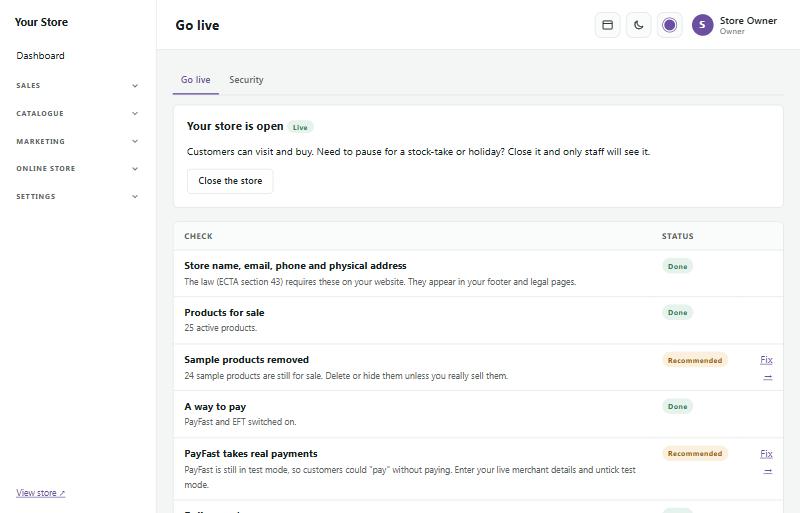
Dintho tse tshwailweng Done di se di loketse; dintho tsa Recommended di na le link ya Fix e o isang leqepheng le nepahetseng.
Ha o kgotsofetse, tobetsa Open my store (e dula e le putswa ha ntho e hlokehang e ntse e haella). Ho fihlela ka nako eo, baeti ba bona leqephe la "Opening soon" (re bula haufinyane) ha wena le basebetsi ba hao le ntse le kgona ho sheba lebenkele la nnete. O ka kwala lebenkele hape neng kapa neng, ka mohlala nakong ya ho bala setoko: tobetsa Close the store leqepheng lona leo.
Ha lebenkele le kwetswe
Tlasa While the store is closed (ha lebenkele le kwetswe) leqepheng la Go live o kgetha seo baeti ba se bonang sebakeng sa lebenkele la hao:
- Heading (sehlooho): "Opening soon" bakeng sa lebenkele le letjha, "Back soon" ha o kwetse nakwana, kapa mantswe a hao.
- Your message (molaetsa wa hao): ntlha eo o ka e kgethang, ka mohlala "Re bala setoko, re tla kgutla ka Mantaha."
- Reopening date and time (letsatsi le nako ya ho bula hape): e bontshwa tjena "Back on Monday 20 October at 09:00". Tshwaya Reopen automatically (bula ka bowona) mme lebenkele le tla ipulela ka nako eo (nakong ya metsotso e ka bang mehlano), ha feela ho se letho leqepheng la Go live le tshwailweng "Must fix". Haeba ho na le ntho, lebenkele le dula le kwetswe mme log ya mesebetsi e hlalosa lebaka.
- Show on the page (bontsha leqepheng): imeile ya lebenkele, fono, nomoro ya WhatsApp (haeba o e beile) le lepetjo.
- The store's header and footer (header le footer ya lebenkele): tlosa letshwao bakeng sa leqephe le hlwekileng, le bohareng le nang le logo ya hao feela: ha ho menyu, dikonopo kapa footer.
Tobetsa Preview the closed page ho le bona kamoo baeti ba le bonang kateng. Beng ba lebenkele ba ka boela ba kopitsa shareable preview link (link ya ponelopele eo o ka e arolelanang): mang kapa mang ya e bulang o bona lebenkele la nnete letsatsi le le leng ha le ntse le kwetswe (e thusa moqapi), ka hona e arolelane ka hloko.
Moqolo wa Storefront kaholimo ho dashboard ya hao o bontsha hore na lebenkele le Open (le butswe) kapa le Closed (le kwetswe) (le nako ya ho bula hape, haeba o e beile), le konopo ya Close the store kapa Open my store. Ha ho ntse ho na le dintho tse lokelang ho lokiswa, e bolela hore ke tse kae mme e na le link e yang ho Go live.